ChatGPT Voice Extension - Chrome Extension
Voice interaction extension for ChatGPT, enabling hands-free conversations.
Screenshots
Overview
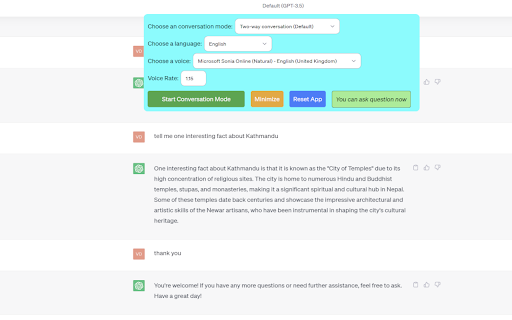
ChatGPT Voice Extension is a Chrome add-on that brings natural speech interaction to the ChatGPT interface. It enables users to speak their prompts instead of typing them, and it can read ChatGPT responses aloud for a fully conversational experience. This hands-free capability is ideal for users who are multitasking, have accessibility needs, or simply prefer an auditory learning style. The extension makes interacting with AI feel more fluid and intuitive, closely mimicking a real conversation. It's a convenient tool that opens up more flexible ways to engage with one of the world's most popular AI assistants.
How to Use
Install the ChatGPT Voice Extension from the Chrome Web Store, then open ChatGPT in your browser. Click the extension’s mic icon to start speaking; your voice is converted to text prompts, and responses can be read aloud. Use it for hands-free Q&A.
Core Features
Use Cases
- 1 Hands-free interaction with ChatGPT
- 2 Voice assistant for quick information retrieval
- 3 Learning languages through voice conversations
- 4 Accessibility for users who prefer voice input
Frequently Asked Questions
How do I start a voice conversation with ChatGPT using this extension?
What conversation modes are available?
Does the extension support multiple languages?
Is this extension affiliated with OpenAI?
Quick Info
- Category
- Voice Generation & Conversion
- Subcategory
- AI Speech-to-Text
- Added on
- Aug 17 2025
- Monthly Visits
- 389
- Rating
- 3.8 / 5.0
- Reviews
- 5






