Gmail Bot
AI-powered Gmail tool for summarizing emails, extracting info, and generating replies.
Screenshots
Overview
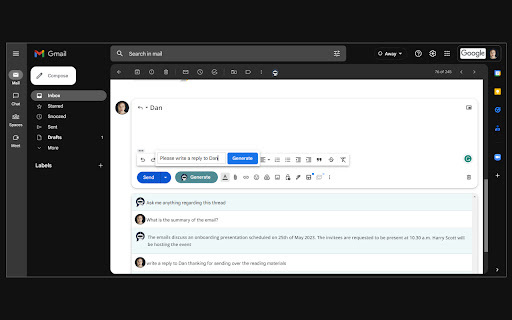
The Gmail Bot brings AI assistance directly into your inbox, turning email management into a faster, less tedious task. It automatically summarizes lengthy threads, extracts key information from messages, and generates thoughtful replies tailored to context. Designed for busy professionals, customer support teams, and anyone overwhelmed by daily emails, it helps cut through clutter while maintaining clear communication. Instead of reading every line or drafting responses from scratch, users can rely on the bot to handle routine heavy lifting. The result is more time, less stress, and a more organized approach to email.
How to Use
Connect the Gmail Bot to your Gmail account and authorize its access. For any email, use the tool to get a summary, extract key information like dates or contacts, and even generate a draft reply that you can review and send.
Core Features
Use Cases
- 1 Summarizing long email conversations
- 2 Extracting key information from emails
- 3 Generating email replies quickly
Frequently Asked Questions
Where can I find the Gmail Bot icon?
How do I generate an email reply using the Gmail Bot?
Quick Info
- Category
- Writing & Editing
- Subcategory
- AI Summarizer
- Rating
- 5.0 / 5.0



