Gmail Bot
AI-powered Gmail tool for summarizing emails, extracting info, and generating replies.
5.0
Rating
Screenshots
Overview
The Gmail Bot is an AI-powered tool designed to enhance productivity within Gmail. It allows users to quickly summarize email threads, extract important information, and generate suitable email responses. The bot integrates directly into the Gmail interface, providing easy access to its features from both the inbox and email threads.
How to Use
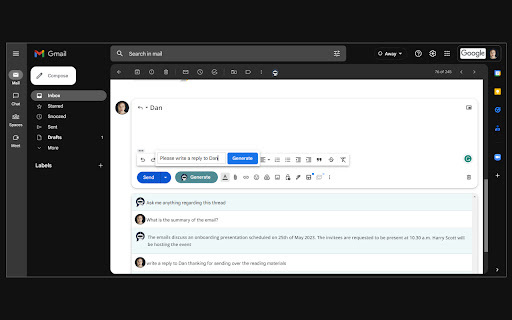
Once installed, the Gmail Bot icon appears at the top of your inbox and email threads. Click the icon to open the popup. To generate a reply, find the 'Generate' button next to the 'Send' button when composing a new message or replying to a thread.
Core Features
Email summarization Information extraction AI-powered email generation
Use Cases
- 1 Summarizing long email conversations
- 2 Extracting key information from emails
- 3 Generating email replies quickly
Frequently Asked Questions
Where can I find the Gmail Bot icon?
After installing the Gmail Bot, the icon appears inside your Gmail interface, typically in the side panel or near the compose area. It lets you access AI features right where you read and write emails.
How do I generate an email reply using the Gmail Bot?
Open the email you want to reply to and click the Gmail Bot icon. It will summarize the email and draft a reply for you, which you can review and edit before sending.
Quick Info
- Category
- Writing & Editing
- Subcategory
- AI Summarizer
- Rating
- 5.0 / 5.0



