Draftio
Draftio transforms web notes into actionable insights with AI and a Chrome extension.
Screenshots
Overview
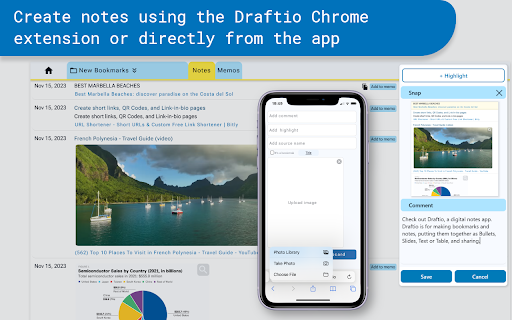
Draftio is an AI-powered tool that turns your web notes into actionable insights. By combining a browser extension with intelligent processing, it captures what you highlight or save while browsing and then transforms those raw snippets into structured, useful takeaways. Instead of letting notes sit idle in folders, Draftio helps you synthesize them into clear next steps, summaries, or ideas you can actually use. It is built for researchers, writers, and knowledge workers who want to turn passive web browsing into a more productive, insight-driven workflow.
How to Use
Install the Chrome extension, then highlight notes or text while browsing. The tool captures your selections and uses AI to transform them into structured, actionable insights. Access your processed notes in the extension dashboard, where you can organize and export them.
Core Features
Use Cases
- 1 Organizing research notes into structured memos
- 2 Summarizing web content for quick understanding
- 3 Sharing research findings with colleagues
- 4 Creating presentations from web-based information
Frequently Asked Questions
What is the purpose of the Draftio Chrome extension?
What formats can I use to style my notes in Draftio?
How can I share my memos created in Draftio?
Quick Info
- Category
- Writing & Editing
- Subcategory
- AI Summarizer
- Rating
- 5.0 / 5.0



