AI Assistant Chrome Extension
AI-powered Chrome extension for enhanced browsing and productivity.
Screenshots
Overview
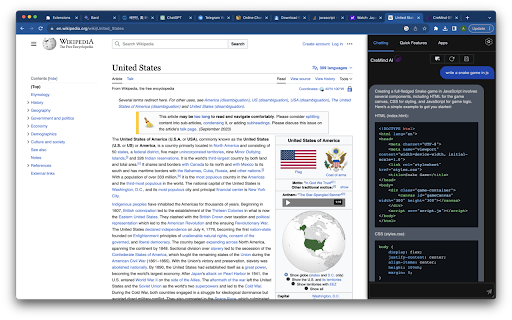
AI Assistant Chrome Extension is a browser add-on that brings AI-powered help directly into your daily web browsing. It is designed to enhance productivity by offering smart assistance as you read, write, and work online. From summarizing web pages and answering questions to drafting text and streamlining repetitive tasks, the extension acts as a lightweight companion that sits right in your browser. Aimed at professionals, students, and everyday users, it helps you work faster and smarter without switching between tabs or platforms.
How to Use
Add the extension to your Chrome browser and pin it to your toolbar. Click the icon whenever you need assistance—type prompts, ask for explanations, or get writing help directly on the current webpage. Use it for translations, quick research, or content generation without leaving your tab.
Core Features
Use Cases
- 1 Chat with an AI assistant while browsing any website.
- 2 Quickly look up word definitions and usage examples.
- 3 Generate content for various topics automatically.
- 4 Summarize long articles or documents for quick understanding.
- 5 Translate text into different languages with natural-sounding results.
- 6 Revise grammar and improve writing quality.
- 7 Generate interview questions based on a candidate's CV.
- 8 Understand code snippets in different programming languages.
- 9 Paraphrase text to avoid plagiarism and improve clarity.
Frequently Asked Questions
Is the Chrome extension free to use?
What do I need to use the extension?
Is the extension stable?
Quick Info
- Category
- Writing & Editing
- Subcategory
- AI Summarizer
- Rating
- 5.0 / 5.0
- Saved
- 1


