AI Command Chrome Extension
AI-powered Chrome extension for text transformation and enhancement.
Screenshots
Overview
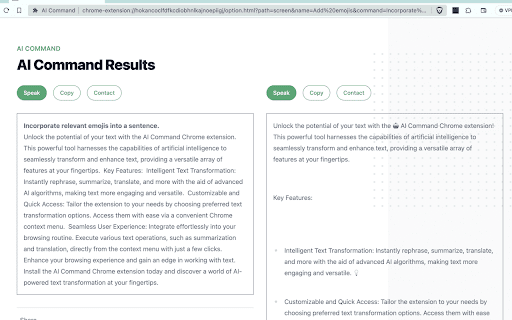
AI Command Chrome Extension is an AI-driven tool that enhances text transformation and enhancement directly within your browser. With simple commands, users can rewrite, polish, or restructure text to improve clarity, tone, or style. This makes it a valuable asset for writers, marketers, and professionals who draft emails, reports, or posts regularly. The extension integrates seamlessly into the browsing experience, allowing on-the-fly editing without disrupting workflow. It is designed to save time and elevate the quality of written content, ensuring that communication is effective and impactful across various platforms and contexts.
How to Use
Add the extension to Chrome, then select text or type new content. Use the command palette or right-click menu to apply actions like paraphrasing, tone adjustment, or grammar correction. Review the enhanced text and copy it back to your document.
Core Features
Use Cases
- 1 Quickly summarize lengthy articles for key information.
- 2 Translate foreign language text into your native language.
- 3 Rephrase text for clarity or a different tone.
Frequently Asked Questions
What kind of text transformations can the AI Command Chrome extension perform?
How do I access the AI Command features?
Quick Info
- Category
- Writing & Editing
- Subcategory
- AI Summarizer
- Rating
- 5.0 / 5.0


