Enigma Extension
Browser extension integrating ChatGPT for various tasks like summarizing and content creation.
Screenshots
Overview
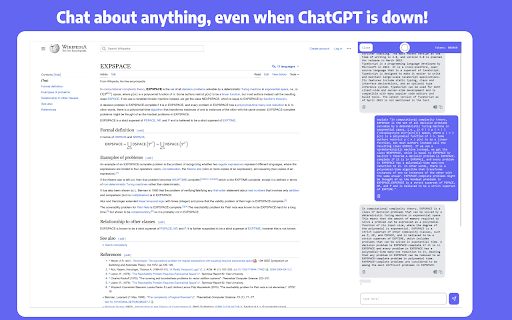
Enigma Extension is a browser extension that brings ChatGPT's conversational intelligence directly into your everyday web browsing. It helps with a variety of tasks, from generating quick summaries of articles and pages to creating original content on the fly. Designed for students, professionals, and casual users alike, it aims to streamline workflows by reducing the need to switch between tabs. Whether you're researching, writing, or just trying to digest large amounts of information, this tool acts as an always-available AI assistant right in your browser.
How to Use
Install the Enigma Extension in your browser, then click its icon whenever you need assistance. Highlight text on any webpage to summarize it, or use the built-in chat panel to generate new content directly. The extension works seamlessly in the background, letting you access ChatGPT-powered help without leaving your current tab.
Core Features
Use Cases
- 1 Summarizing long research papers or articles
- 2 Drafting social media posts for a marketing campaign
- 3 Writing professional emails for work
- 4 Getting quick answers from online resources
- 5 Translating foreign language content
Frequently Asked Questions
How do I open the Enigma sidebar?
Can I use Enigma to summarize any webpage?
Can I download the responses from Enigma?
Quick Info
- Category
- Writing & Editing
- Subcategory
- AI Summarizer
- Rating
- 5.0 / 5.0



