Superchat.fyi
Free browser note-taking tool powered by ChatGPT for efficient web note-taking.
5.0
Rating
Screenshots
Overview
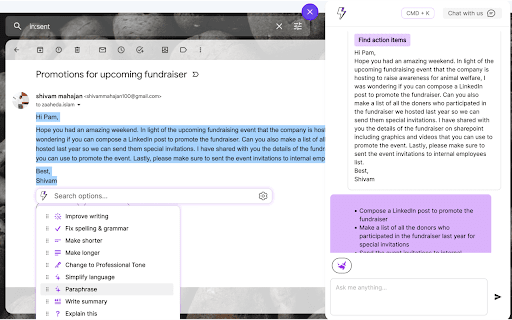
Superchat.fyi is a free browser note-taking application powered by ChatGPT, designed to amplify your note-taking experience on the web. It allows users to summarize, translate, paraphrase, and store information directly within their notes. It also offers features like image drag-and-drop, AI-powered writing assistance, and to-do list creation.
How to Use
Download the extension, sign up with Google, and start jotting down notes directly on any webpage.
Core Features
Summarize, translate, and paraphrase web content Drag and drop images directly into notes AI-powered writing assistance To-do list creation Notion integration (Beta)
Use Cases
- 1 Taking notes while browsing the web
- 2 Summarizing articles and web pages
- 3 Translating foreign language content
- 4 Brainstorming ideas with AI assistance
- 5 Creating to-do lists for web-based tasks
- 6 Clipping content to Notion
Frequently Asked Questions
What is SuperChat.fyi?
Superchat.fyi is a free browser note-taking tool powered by ChatGPT that helps you create and organize web notes efficiently.
How does it work?
You install the browser extension and use its ChatGPT-powered features to write, refine, and manage notes directly while browsing web pages.
Can I use this extension for commercial purposes?
Yes, you can use the extension for commercial purposes since it is free to use.
Is it free to use?
Yes, Superchat.fyi is completely free to use.
Can I share my feedback and suggestions with the team?
Yes, you can share your feedback and suggestions with the team through the extension or its website.
Does it support multiple languages?
Yes, the extension supports multiple languages for a broader audience.
Is it secure and privacy-compliant?
Yes, the extension is designed to be secure and privacy-compliant, following relevant privacy standards.
What happens if I encounter a problem while using the extension?
If you encounter a problem, you can contact the support team for help and troubleshooting.
Quick Info
- Category
- Writing & Editing
- Subcategory
- AI Summarizer
- Rating
- 5.0 / 5.0


