TabMagic
Chrome extension for organizing, summarizing, and interacting with browser tabs.
Screenshots
Overview
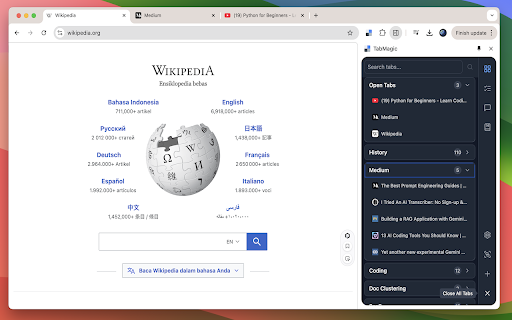
TabMagic is a Chrome extension designed to declutter your browsing experience by organizing, summarizing, and interacting with multiple open tabs. It helps you group related tabs for better workflow, generates concise summaries of page content to quickly grasp essential information, and enables interactive commands for streamlined navigation. Whether you're managing research projects, planning trips, or simply juggling dozens of tabs, TabMagic reduces browser chaos, saving you time and effort. This tool is perfect for power users, students, and professionals who rely heavily on their browser for multitasking and need a smarter way to keep everything in order.
How to Use
Install TabMagic from the Chrome Web Store, then it automatically organizes your open tabs. Click the extension icon to view a summarized list, ask questions about tab content, or merge and close tabs to reduce clutter.
Core Features
Use Cases
- 1 Organizing research tabs into project-specific groups.
- 2 Saving frequently accessed work-related tabs for quick access.
- 3 Summarizing lengthy articles to quickly grasp key points.
- 4 Interacting with documentation through the chat feature to find specific information.
Frequently Asked Questions
What is TabMagic?
Do I need an API key to use all of TabMagic's features?
Is TabMagic free?
Quick Info
- Category
- Writing & Editing
- Subcategory
- AI Summarizer
- Rating
- 5.0 / 5.0



