Highlights AI
Highlights AI helps quickly understand webpages with summaries, highlights, and ChatGPT Q&A.
Screenshots
Overview
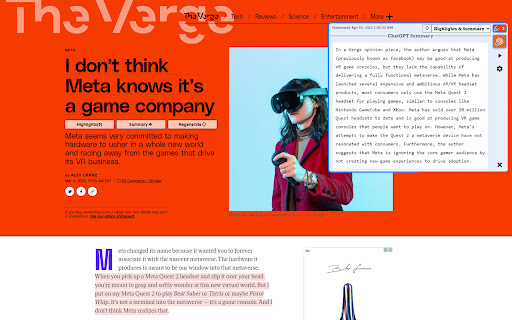
Highlights AI is a browser tool designed to help you quickly grasp the essence of any webpage. Instead of reading through lengthy articles, it generates clear summaries and highlights the most important information at a glance. What sets it apart is its integrated ChatGPT Q&A feature, allowing you to ask specific questions about the content and get direct answers. This makes it ideal for students, researchers, and professionals who need to process large amounts of online information efficiently.
How to Use
Install the extension, then open any webpage. Click the Highlights AI icon to generate a summary and see key passages highlighted automatically. Use the ChatGPT Q&A panel to ask follow-up questions about the page content directly.
Core Features
Use Cases
- 1 Quickly understanding the main points of a news article.
- 2 Identifying key information in a research paper.
- 3 Getting a concise overview of a lengthy blog post.
- 4 Finding specific answers to questions about a webpage's content.
Frequently Asked Questions
What is Highlights AI?
What features does Highlights AI offer?
How does Highlights AI save time?
Quick Info
- Category
- Writing & Editing
- Subcategory
- AI Summarizer
- Rating
- 5.0 / 5.0



