Patent Highlighter
Browser extension that highlights technical information in patents, suppressing legal jargon.
Screenshots
Overview
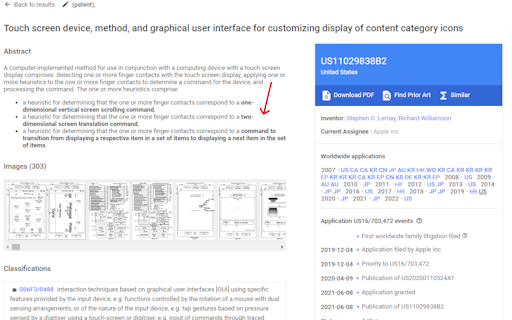
Patent Highlighter is a specialized browser extension designed to simplify patent reading by highlighting the technical information while suppressing dense legal jargon. It helps inventors, engineers, patent attorneys, and researchers quickly identify the core technological aspects of patent documents without getting bogged down by complex legalese. This tool significantly speeds up prior art searches and competitive analysis by focusing attention on what matters most—the technical innovation. It's an invaluable asset for anyone working in intellectual property and technology development.
How to Use
Install the browser extension and open a patent document online. The tool automatically scans the page, highlighting technical information in a distinct color while suppressing legal jargon, so you can focus on the inventive core and technical details without wading through dense legalese.
Core Features
Use Cases
- 1 Quickly identify key technical details in patents
- 2 Improve reading speed and comprehension of patent documents
- 3 Filter out legal jargon to focus on the invention itself
Frequently Asked Questions
What does the Patent Highlighter do?
How do I use the Patent Highlighter?
Does the Patent Highlighter change the original patent text?
Quick Info
- Category
- Writing & Editing
- Subcategory
- AI Summarizer
- Rating
- 5.0 / 5.0



