Patent Highlighter
Browser extension that highlights technical information in patents, suppressing legal jargon.
5.0
Rating
Screenshots
Overview
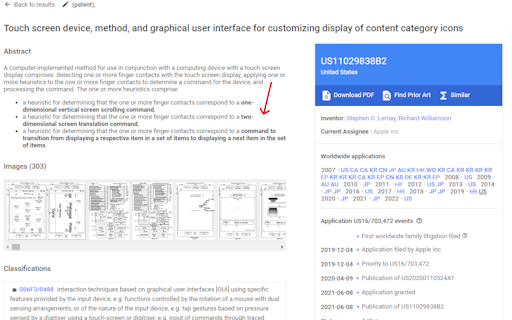
The Patent Highlighter is a browser extension designed to improve the efficiency of reading and understanding patents. It highlights technical information within patent documents while suppressing noisy legal language, allowing users to quickly identify key inventions and technical details without altering the original text drafted by the inventor.
How to Use
1. Open a patent on Google Patents. 2. Click the Patent Highlighter extension icon in your browser. 3. Click the 'Highlight' button. 4. Wait for the important information to be highlighted.
Core Features
Highlights technical information in patents Suppresses noisy legal language Maintains the original text drafted by the inventor Browser extension integration
Use Cases
- 1 Quickly identify key technical details in patents
- 2 Improve reading speed and comprehension of patent documents
- 3 Filter out legal jargon to focus on the invention itself
Frequently Asked Questions
What does the Patent Highlighter do?
The Patent Highlighter highlights the technical information in patent documents while de-emphasizing legal jargon, so you can focus on what a patent actually covers.
How do I use the Patent Highlighter?
Install the browser extension, open a patent document, and it automatically highlights the key technical details and tones down the legal language for easier reading.
Does the Patent Highlighter change the original patent text?
No, it only changes how the text is displayed, highlighting technical details and suppressing legal jargon; the original patent content remains unchanged.
Quick Info
- Category
- Writing & Editing
- Subcategory
- AI Summarizer
- Rating
- 5.0 / 5.0



