ChatGPT Browser Extension
Browser extension to process selected text with ChatGPT for summaries, quizzes, and custom prompts.
Screenshots
Overview
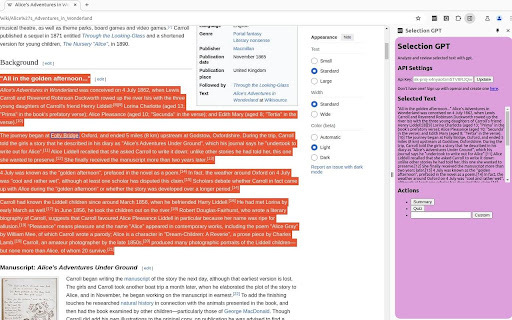
The ChatGPT Browser Extension is a versatile productivity tool that integrates ChatGPT's processing power directly into your web browser. It allows users to select any text on a webpage and instantly apply custom AI actions, such as generating summaries, creating quizzes, or running other personalized prompts. This provides a seamless workflow for students, researchers, and writers who want to interact with online information more deeply. Instead of copying text back and forth to a separate platform, this extension brings the power of AI to wherever you are on the web, streamlining research and comprehension tasks.
How to Use
Install the extension, then select any text on a webpage. Right-click to choose a ChatGPT action like summary, quiz, or a custom prompt. The response appears in a sidebar or popup directly in your browser. Customize your own prompts for repeated tasks.
Core Features
Use Cases
- 1 Summarizing articles and web pages
- 2 Creating review quizzes for learning
- 3 Using custom prompts for various text processing tasks
Frequently Asked Questions
Do I need an OpenAI account to use this extension?
Where do I get an OpenAI API key?
Quick Info
- Category
- Writing & Editing
- Subcategory
- AI Summarizer
- Rating
- 5.0 / 5.0



