ChatGPT Browser Extension
Browser extension to process selected text with ChatGPT for summaries, quizzes, and custom prompts.
5.0
Rating
Screenshots
Overview
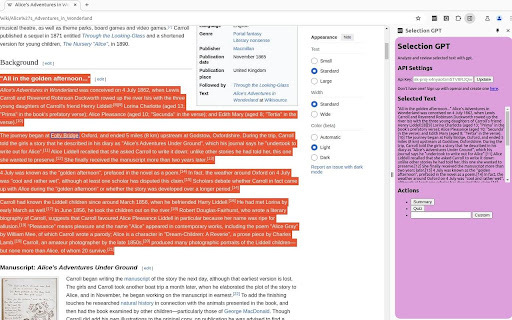
This extension allows you to more easily process text you read through the browser by allowing you to process selected text with ChatGPT. There are one-click buttons for generating a summary or review quiz, or you can use a custom prompt. You will have to insert your own OpenAI API key from https://platform.openai.com/api-keys to use.
How to Use
Install the extension, select text in your browser, and use the one-click buttons for summary or quiz generation, or enter a custom prompt. You'll need to provide your OpenAI API key.
Core Features
Text processing with ChatGPT directly in the browser One-click summary generation One-click review quiz generation Custom prompt support
Use Cases
- 1 Summarizing articles and web pages
- 2 Creating review quizzes for learning
- 3 Using custom prompts for various text processing tasks
Frequently Asked Questions
Do I need an OpenAI account to use this extension?
Yes, you need an OpenAI account with an API key to process selected text through the ChatGPT Browser Extension.
Where do I get an OpenAI API key?
You can get an OpenAI API key by signing up at the OpenAI platform (platform.openai.com) and creating a key in your account settings.
Quick Info
- Category
- Writing & Editing
- Subcategory
- AI Summarizer
- Rating
- 5.0 / 5.0



