FactSet Internal Research Notes Extension
FactSet extension for creating notes and auto-tagging entities while browsing.
5.0
Rating
Screenshots
Overview
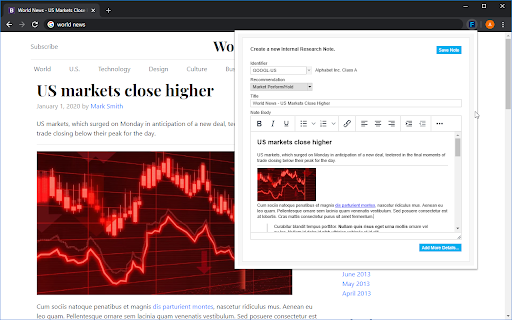
The FactSet Internal Research Notes Extension allows users to create notes while browsing web content. It features a native entity recognition module that automatically tags FactSet entities based on the selected content. This extension is exclusively for FactSet subscribers.
How to Use
Install the FactSet Chrome Extension. Browse the web and select content. The extension allows you to create notes related to the selected content. The built-in entity recognition module will automatically tag relevant FactSet entities.
Core Features
Note creation while browsing Automatic FactSet entity tagging Integration with FactSet platform
Use Cases
- 1 Researching companies and industries online and easily saving relevant information and tagging entities for later use within FactSet.
Frequently Asked Questions
Who can use the FactSet Internal Research Notes Extension?
The FactSet Internal Research Notes Extension is available to FactSet users who have access to the platform's research note functionality.
What does the FactSet Internal Research Notes Extension do?
It lets you create research notes while browsing and automatically tags relevant entities like companies and people, saving you manual entry time.
Quick Info
- Category
- Writing & Editing
- Subcategory
- AI Text Classifier
- Rating
- 5.0 / 5.0