AI Summary for YouTube Easy Copy with ChatGPT
Summarizes YouTube videos, saves time, and allows easy copying of information.
5.0
Rating
Screenshots
Overview
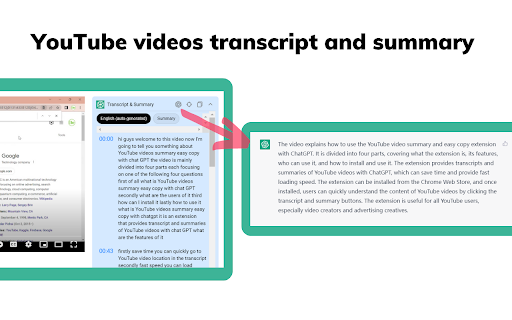
AI Summary for YouTube Easy Copy with ChatGPT provides access to summaries of YouTube videos. It allows users to quickly get the content of YouTube videos, save time, and learn faster. Additionally, it enables easy copying of information from YouTube and chat.openai.com pages.
How to Use
1. Go to YouTube. 2. Choose a video. 3. Click the 'Transcript & summary' button. 4. Click the 'View AI Summary' icon (requires ChatGPT login). 5. Click the 'Copy' icon to get the summary. 6. Fill in the API key in the settings page to show the summary directly on YouTube.
Core Features
Quick access to YouTube video summaries Easy copying of transcripts and summaries Direct integration with ChatGPT for AI summaries Fast loading of video summaries Quick navigation to specific locations in the transcript
Use Cases
- 1 Quickly understanding the content of YouTube videos without watching the entire video
- 2 Copying key information from YouTube videos for research or note-taking
- 3 Learning faster by accessing summarized content
- 4 Facilitating discussions and sharing of YouTube video content
Frequently Asked Questions
What is AI Summary for YouTube Easy Copy with ChatGPT?
It is a tool that summarizes YouTube videos using ChatGPT and lets you easily copy the summaries to save time.
Do I need a ChatGPT account to use this extension?
Yes, you need a ChatGPT account to access the AI summarization features.
How do I get the video summary directly on YouTube?
The extension adds a summary button on YouTube pages so you can generate and copy a summary of any video in one click.
Quick Info
- Category
- Voice Generation & Conversion
- Subcategory
- AI Transcription
- Rating
- 5.0 / 5.0