RED
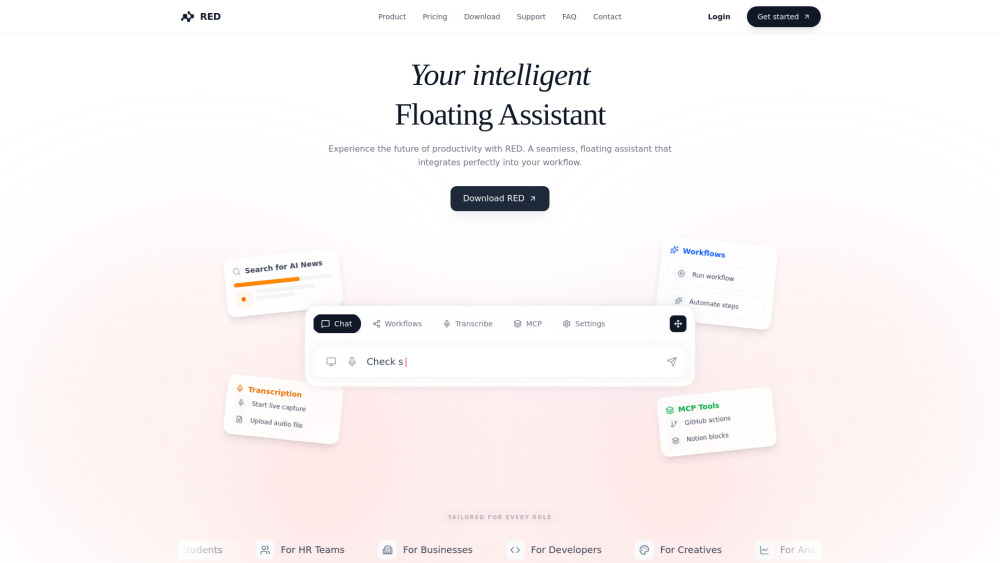
Smart, floating AI assistant combining screen analysis, transcription, and automation in real-time.
Screenshots
Overview
RED is a smart, floating AI assistant designed to bring real-time intelligence to any screen. It combines live screen analysis, voice and text transcription, and automation tools in a single floating interface that users can access while working across different applications. Whether attending virtual meetings, researching online, or performing repetitive computer tasks, RED provides contextual assistance and can automate parts of the workflow. The assistant is aimed at power users, remote workers, and professionals seeking to optimize their digital efficiency. By understanding what appears on the screen, RED truly bridges the gap between ambient computing and proactive support.
How to Use
Activate RED to float over your screen, then use it to analyze what you see. It transcribes audio in real time and can trigger automated actions based on your commands. Just speak or click to manage tasks without switching apps, as it works across your OS.
Core Features
Use Cases
- 1 Automate routine tasks using tailored workflows, such as generating daily news reports or summarizing text.
- 2 Capture and summarize meetings in real-time, allowing users to focus on the conversation.
- 3 Perform coding tasks like reviewing PRs, generating scaffolding, or refactoring code based on local repository context.
- 4 Manage files, documents, and communications directly through the chat interface using integrations like Google Drive, Slack, and Notion.
Frequently Asked Questions
How does RED integrate with my existing tools?
Is my data private?
Can I use RED for coding?
Does it work on Windows and Linux?
Quick Info
- Category
- Voice Generation & Conversion
- Subcategory
- AI Transcription
- Added on
- Jan 30 2026
- Monthly Visits
- --
- Rating
- 5.0 / 5.0