Archie.AI
Chrome extension for accessing Google Analytics data via plain English queries.
Screenshots
Overview
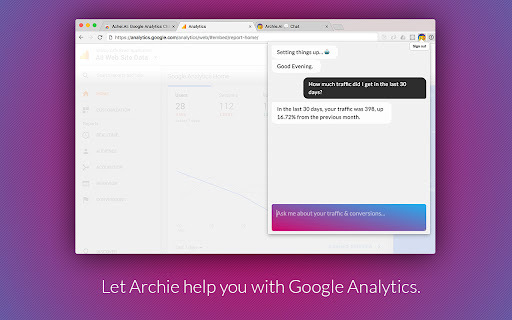
Archie.AI is a Chrome extension that makes Google Analytics accessible to everyone by allowing users to query data using plain English. Instead of navigating complex dashboards and reports, you can simply type questions like “How many visitors last week?” or “What’s my top traffic source?”—and instantly get clear answers. It's perfect for marketers, business owners, and analysts who want quick insights without diving into technical details. With Archie.AI, data-driven decision-making becomes faster, easier, and far less intimidating.
How to Use
Install the Archie.AI extension in Chrome and connect it to your Google Analytics account. Type a query in plain English, like “What were my top pages last month?” The tool interprets it, fetches the relevant data, and displays the answer directly in the browser without manual report navigation.
Core Features
Use Cases
- 1 Quickly check website traffic for the last 7 days.
- 2 Get a weekly or daily briefing on key metrics.
- 3 Predict next week's traffic.
- 4 Monitor traffic from specific sources like Facebook or Google.
- 5 Track conversions and revenue over a specified period.
- 6 Identify the most used device types by website visitors.
Frequently Asked Questions
How do I use Archie.AI?
What kind of questions can I ask Archie.AI?
Do I need to log in to Google Analytics separately?
Quick Info
- Category
- Voice Generation & Conversion
- Subcategory
- AI Voice Assistants
- Rating
- 5.0 / 5.0