Voice Control for Netflix
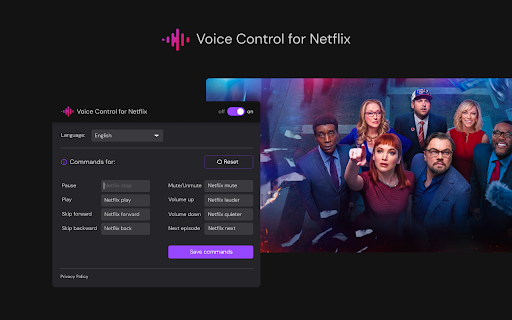
Control Netflix with your voice: play, pause, fast-forward, and more.
Screenshots
Overview
Voice Control for Netflix brings hands-free command to your streaming experience. This Chrome extension lets you control Netflix playback using voice commands — play, pause, fast-forward, rewind, and more — without needing to reach for your keyboard or remote. It's built for viewers who want a more immersive or accessible way to watch, especially when binge-watching from bed, cooking, or multitasking. The extension simplifies navigation so you can focus on the screen and let your voice do the work.
How to Use
Install the extension and open Netflix in Chrome. Click the extension icon to activate voice control, then speak commands like "play," "pause," "fast forward," or "next episode." The extension listens via your microphone and executes the corresponding Netflix player action automatically.
Core Features
Use Cases
- 1 Controlling Netflix while cooking or exercising
- 2 Assisting users with mobility impairments to navigate Netflix
- 3 Hands-free control during movie nights
Frequently Asked Questions
Q: What actions can I control with Voice Control for Netflix? A: You can control Netflix with your voice, including play, pause, and fast-forward, without touching your remote.
Quick Info
- Category
- Voice Generation & Conversion
- Subcategory
- AI Voice Assistants
- Rating
- 5.0 / 5.0