Voice Control for Netflix
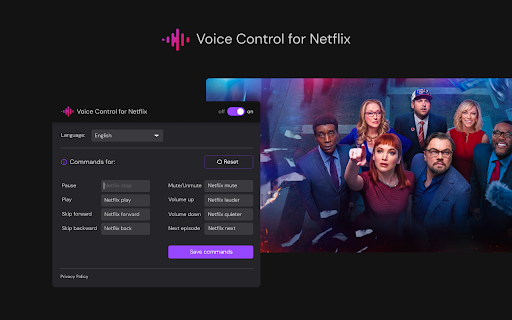
Control Netflix with your voice: play, pause, fast-forward, and more.
5.0
Rating
Screenshots
Overview
Voice Control for Netflix allows users to control their Netflix experience using voice commands. This includes actions like playing, pausing, fast-forwarding, and more, all without needing to use a remote or touch the screen.
How to Use
Simply enable Voice Control for Netflix and use voice commands to control playback, navigate menus, and search for content.
Core Features
Voice control for Netflix playback (play, pause, fast-forward, rewind) Hands-free navigation of Netflix menus Voice search for movies and TV shows
Use Cases
- 1 Controlling Netflix while cooking or exercising
- 2 Assisting users with mobility impairments to navigate Netflix
- 3 Hands-free control during movie nights
Frequently Asked Questions
Q: What actions can I control with Voice Control for Netflix? A: You can control Netflix with your voice, including play, pause, and fast-forward, without touching your remote.
For details, please visit the official website of Voice Control for Netflix.
Quick Info
- Category
- Voice Generation & Conversion
- Subcategory
- AI Voice Assistants
- Rating
- 5.0 / 5.0