ChatGPT Voice Extension
Voice interaction extension for ChatGPT, enabling hands-free conversations.
Screenshots
Overview
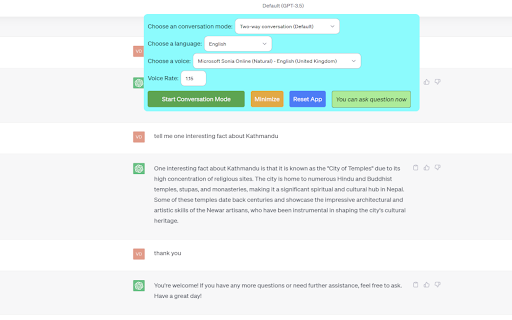
The ChatGPT Voice Extension brings hands-free conversation to ChatGPT, letting you speak your questions aloud and hear the assistant respond. It connects directly to your browser, so you can interact with ChatGPT without having to type—perfect for when you're busy, multitasking, or just prefer talking things through. The extension is designed to make your interactions feel more natural, turning the chatbot into something more akin to a voice assistant. If you're already using ChatGPT and want to break free from the keyboard, this tool adds a seamless voice experience to your existing workflow.
How to Use
Add the ChatGPT Voice Extension to your browser and grant microphone access. Speak your prompts instead of typing, and the extension sends them to ChatGPT. It then reads the AI's responses aloud for a fully hands-free conversation.
Core Features
Use Cases
- 1 Hands-free interaction with ChatGPT
- 2 Voice assistant for quick information retrieval
- 3 Learning languages through voice conversations
- 4 Accessibility for users who prefer voice input
Frequently Asked Questions
How do I start a voice conversation with ChatGPT using this extension?
Quick Info
- Category
- Voice Generation & Conversion
- Subcategory
- AI Voice Assistants
- Rating
- 5.0 / 5.0





