Chrome Extension: Speech Recognition & Text-to-Speech
Chrome extension for speech recognition, text-to-speech, and real-time translation.
Screenshots
Overview
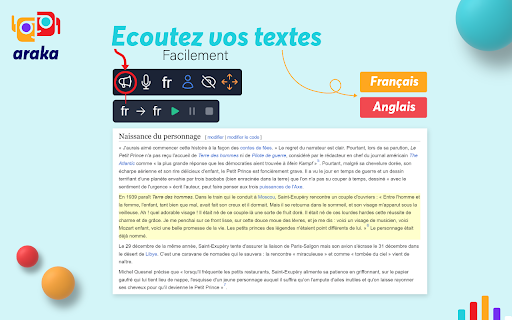
This Chrome extension brings speech recognition, text-to-speech, and real-time translation directly into your browser. It allows you to dictate text, have web content read aloud, and translate conversations or pages on the fly, all without leaving your current tab. Whether you are a student researching in foreign languages, a professional attending multilingual meetings, or someone with accessibility needs, this tool aims to make browsing more inclusive and hands-free.
How to Use
Install the Chrome extension and grant mic or speaker permissions. Click the extension icon to start speech recognition or convert selected text to speech. Use the translation feature to convert spoken or written content into another language in real time.
Core Features
Use Cases
- 1 Quickly transcribe audio content during job interviews or work meetings to save time and improve note-taking.
- 2 Use speech recognition to draft job offers or recruitment ads more quickly and efficiently.
- 3 Improve the speed of writing SEO content by using speech recognition to write articles or website pages.
- 4 Facilitate content creation for people with typing or reading difficulties by using speech recognition to write texts.
- 5 Save time on tedious tasks by using speech recognition to enter text into web marketing, data tracking, or project management tools.
- 6 Improve the accessibility of online content by providing a voice input option for forms or text input fields.
- 7 Use text-to-speech to quickly generate audio content from text.
- 8 Improve the accessibility of online content by offering a voice reading option for articles or website pages.
- 9 Facilitate the understanding of content for people with reading difficulties by using text-to-speech to read text aloud.
- 10 Transform written content in multiple languages by using automatic translation and text-to-speech to generate audio content in different languages.
- 11 Improve the speed of content production by using text-to-speech to read text aloud while you write or create content.
- 12 Use text-to-speech to generate audio content for advertisements or online ads.
Frequently Asked Questions
This Chrome extension adds speech recognition, text-to-speech, and real-time translation to your browser. It supports multiple languages — dictate with speech recognition, read text aloud with TTS, and translate speech in real time.
Quick Info
- Category
- Voice Generation & Conversion
- Subcategory
- AI Voice Over
- Rating
- 5.0 / 5.0





