QPEDIT With AI & QPNOTES - Chrome Extension
Chrome extension for AI-powered writing, editing, and prompt management with QPNOTES integration.
Screenshots
Overview
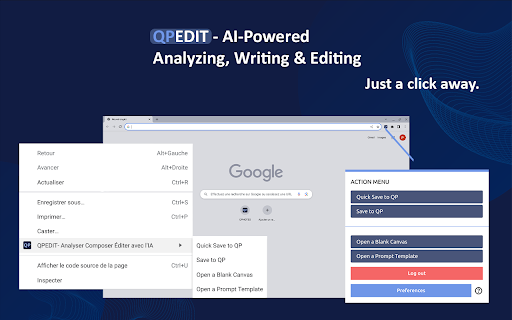
QPEDIT With AI & QPNOTES is a Chrome extension that pairs AI-powered writing and editing tools with integrated prompt management through QPNOTES. Users can polish text directly on any webpage, generate new copy, or apply reusable custom prompts—all within their browser. The QPNOTES integration adds a layer of organization, allowing frequent prompts and snippets to be saved and accessed quickly for consistent workflows. Designed for writers, marketers, and researchers who want speed without sacrificing control, this extension consolidates fragmented editing tasks into a single, always-available interface.
How to Use
Install the QPEDIT extension and use it to edit or write text directly on any webpage. Leverage AI-powered suggestions or your own prompts for quick revisions, and manage saved prompts via QPNOTES integration. Access notes and edits from the extension popup without leaving your current tab.
Core Features
Use Cases
- 1 QPEDIT With AI & QPNOTES ai chrome extension's Use Cases
- 2 Refining lists (names, emails, addresses, etc.)
- 3 Sentiment analysis and categorization for
- 4 Crafting succinct summaries
- 5 Engaging in online dialogue with thoughtful replies
- 6 Experimenting with prompt variations in real-time
- 7 Optimizing ad copy and SEO metadata
- 8 Enhancing landing page text
- 9 Performing quick and accurate translations
- 10 Structuring and expanding content
- 11 Personalizing email and blog writing
- 12 Sparking new blog post concepts
- 13 Composing detailed paragraphs or step-by-step guides
Frequently Asked Questions
QPEDIT is a Chrome extension for AI-powered writing, editing, and prompt management that integrates with QPNOTES so you can save and reuse your prompts across sessions. It supports multiple AI models, and while the subscription covers AI usage, you can also connect your own API key — you access it straight from the Chrome toolbar after installing.
Quick Info
- Category
- Writing & Editing
- Subcategory
- AI Writing Assistants
- Added on
- Feb 25 2024
- Monthly Visits
- 55
- Rating
- 0.0 / 5.0



