LongShot AI - Chrome Extension
AI writing assistant for content creation on any webpage.
Screenshots
Overview
LongShot AI's Chrome Extension brings advanced writing assistance directly into your web browser, enabling seamless content creation on any webpage. Whether you're drafting an email, composing a social media post, or writing a blog entry, this tool integrates with your workflow to help generate and refine text without switching tabs. It is designed for content creators, marketers, and everyday writers looking to accelerate their output and improve quality. By leveraging AI capabilities in situ, it streamlines the writing process, making it more efficient and intuitive across all your online activities.
How to Use
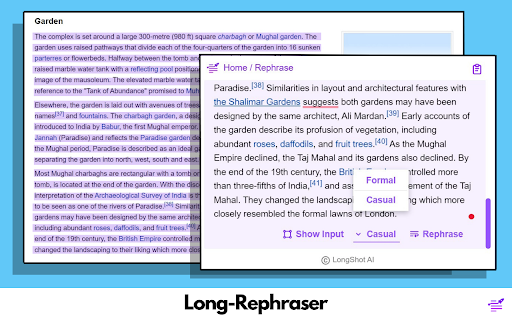
Install the Chrome extension, then highlight text or open the assistant on any webpage. Input your content topic or select existing text, and LongShot AI will generate or rewrite it directly in your browser. You can then edit, copy, or export the result to your preferred platform without switching tabs.
Core Features
Use Cases
- 1 LongShot AI ai chrome extension's Use Cases
- 2 Rephrasing content on any website.
- 3 Inserting text seamlessly into existing content.
- 4 Summarizing long paragraphs for quick overviews.
- 5 Adjusting the tone of writing for different audiences.
Frequently Asked Questions
LongShot AI is a Chrome extension writing assistant that offers Long-Rephraser for rewriting, Joom-In Text for expanding, and Joom-Out Text for condensing content on any webpage. You can customize the tone of the generated content to fit your audience.
Quick Info
- Category
- Writing & Editing
- Subcategory
- AI Writing Assistants
- Added on
- Mar 27 2024
- Monthly Visits
- 2.0K
- Rating
- 4.0 / 5.0
- Reviews
- 6