ChatGPT Chrome Extension - Chrome Extension
Use ChatGPT on any tab without copy-pasting for enhanced productivity.
Screenshots
Overview
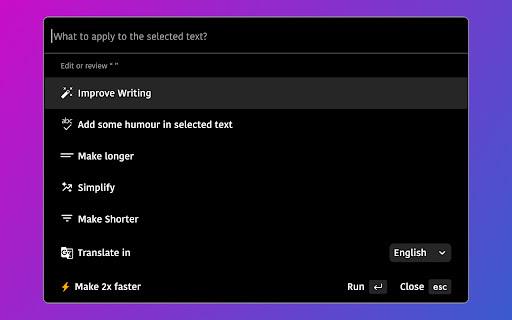
The ChatGPT Chrome extension transforms your browsing experience by making ChatGPT accessible on any tab, eliminating the need for tedious copy-pasting between windows. With this extension, you can invoke ChatGPT directly from your browser toolbar to ask questions, get summaries, or generate text while you work on any website. Designed for busy professionals, researchers, and everyday internet users, it enhances productivity by keeping AI assistance right where you need it—seamlessly integrated into your workflow. If you frequently toggle between ChatGPT and other tabs, this tool helps you stay focused and efficient.
How to Use
Install the extension from the Chrome Web Store, then click its icon in the toolbar to open a ChatGPT panel. Use it on any webpage—highlight text to ask questions, get explanations, or generate content—without switching tabs. Replies appear in a side panel, and you can copy them directly into your current page.
Core Features
Use Cases
- 1 ChatGPT Chrome Extension ai chrome extension's Use Cases
- 2 Write emails like a native speaker by improving grammar, spelling, and writing style.
- 3 Get human-like answers to searches without sifting through Google results.
- 4 Generate social media post drafts when you're stuck for ideas.
- 5 Fix code bugs faster with explanations and solutions.
Frequently Asked Questions
How do I use the extension?
What can I use this extension for?
Quick Info
- Category
- Writing & Editing
- Subcategory
- AI Writing Assistants
- Added on
- Sep 06 2024
- Monthly Visits
- 184
- Rating
- 4.2 / 5.0
- Reviews
- 5



