ChatGPT Chrome Extension - Chrome Extension
Use ChatGPT on any tab without copy-pasting for enhanced productivity.
4.2
Rating
5
Reviews
184
Visits/mo
Screenshots
Overview
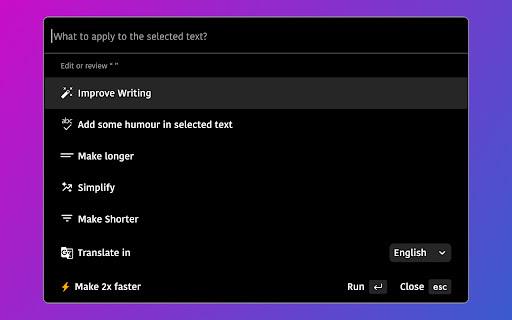
This Chrome extension supercharges your productivity by allowing you to use ChatGPT on any tab without the hassle of copy-pasting. It helps improve your writing, generate blog posts, and solve coding issues with a simple keyboard shortcut.
How to Use
How to use ChatGPT Chrome Extension ai chrome extension? Install the Chrome extension. Select text on any webpage and press Ctrl/Alt + G to use ChatGPT with the selected text.
Core Features
ChatGPT Chrome Extension ai chrome extension's Core Features Use ChatGPT on any tab without copy-pasting Keyboard shortcut (Ctrl/Alt + G) for quick access Contextual AI assistance on any webpage
Use Cases
- 1 ChatGPT Chrome Extension ai chrome extension's Use Cases
- 2 Write emails like a native speaker by improving grammar, spelling, and writing style.
- 3 Get human-like answers to searches without sifting through Google results.
- 4 Generate social media post drafts when you're stuck for ideas.
- 5 Fix code bugs faster with explanations and solutions.
Frequently Asked Questions
How do I use the extension?
Install the extension in Chrome and ChatGPT becomes available on any tab, so you can use it without copy-pasting text between sites.
What can I use this extension for?
You can use it for quick answers, drafting, summarizing, and other ChatGPT tasks right inside the page you are viewing, boosting your productivity.
Quick Info
- Category
- Writing & Editing
- Subcategory
- AI Writing Assistants
- Added on
- Sep 06 2024
- Monthly Visits
- 184
- Rating
- 4.2 / 5.0
- Reviews
- 5


