ChatGPT Explain - Chrome Extension
Chrome extension for simplifying complex concepts in selected text.
Screenshots
Overview
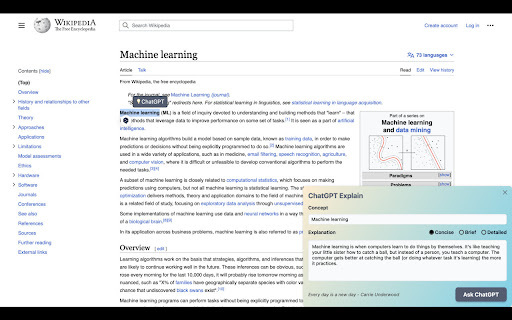
The ChatGPT Explain Chrome extension is designed specifically for simplifying complex concepts directly within the text you're reading. When you come across a challenging paragraph or phrase on any website, you can select that text and the extension will provide a clearer, more accessible explanation courtesy of ChatGPT. This is an invaluable tool for students, researchers, and lifelong learners who frequently encounter unfamiliar terminology or complicated ideas. It transforms the act of web reading into an interactive learning experience, making dense material more approachable and reducing the friction of having to look up explanations elsewhere.
How to Use
Highlight any text on a webpage, then right-click and select the ChatGPT Explain option from the context menu. The extension will provide a simplified explanation of the selected concept in a small popup, making complex topics easier to understand.
Core Features
Use Cases
- 1 ChatGPT Explain ai chrome extension's Use Cases
- 2 Understanding complex academic papers
- 3 Quickly grasping new industry jargon
- 4 Simplifying technical documentation
Frequently Asked Questions
ChatGPT Explain is a free Chrome extension that simplifies complex concepts in any text you select. Install it from the Chrome Web Store, select any passage, and it breaks it down into easy-to-understand explanations.
Quick Info
- Category
- Writing & Editing
- Subcategory
- AI Writing Assistants
- Added on
- Mar 18 2023
- Monthly Visits
- 613
- Rating
- 4.2 / 5.0
- Reviews
- 19



