ChatGPT Sidebar Assistant - Chrome Extension
Access ChatGPT from any webpage without switching tabs.
Screenshots
Overview
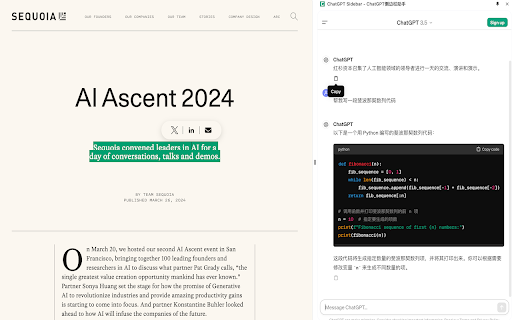
The ChatGPT Sidebar Assistant is a Chrome extension that brings ChatGPT's capabilities directly into your browser workflow. Instead of constantly switching between tabs to consult the AI, you can access it from a convenient sidebar panel on any webpage you're visiting. This makes it ideal for researchers, writers, and professionals who need quick answers, summaries, or writing assistance while browsing. The tool is designed to minimize context switching, helping you stay focused on your current task while still having instant access to a powerful AI assistant whenever you need it.
How to Use
Install the extension, then click its icon in your browser toolbar whenever you want to ask ChatGPT a question. A sidebar will open on the current page, letting you type prompts and receive answers without leaving the website you're on.
Core Features
Use Cases
- 1 ChatGPT Sidebar Assistant ai chrome extension's Use Cases
- 2 Summarize articles or web pages quickly
- 3 Translate text from one language to another
- 4 Generate email drafts or social media posts
- 5 Get quick answers to questions without leaving the current page
- 6 Brainstorm ideas or outlines for writing projects
Frequently Asked Questions
ChatGPT Sidebar Assistant lets you access ChatGPT from any webpage without switching tabs. It works in compatible browsers and is free to use, though a ChatGPT account is required.
Quick Info
- Category
- Writing & Editing
- Subcategory
- AI Writing Assistants
- Added on
- May 06 2024
- Monthly Visits
- 101
- Rating
- 0.0 / 5.0



