ChatGPT Sidebar Assistant - Chrome Extension
Access ChatGPT from any webpage without switching tabs.
Screenshots
Overview
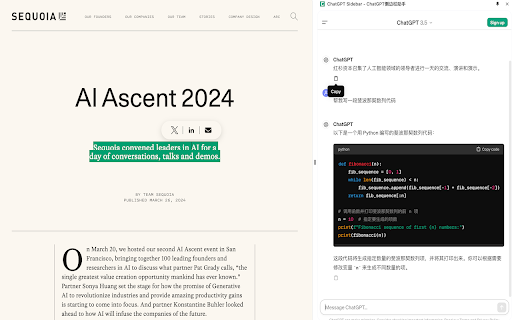
ChatGPT Sidebar Assistant is a tool designed to help users access and utilize ChatGPT directly from any webpage without needing to switch tabs or applications. It allows for seamless integration of ChatGPT's capabilities into your browsing experience, enabling you to quickly generate text, summarize content, translate languages, and more, all within a convenient sidebar.
How to Use
How to use ChatGPT Sidebar Assistant ai chrome extension? Install the ChatGPT Sidebar Assistant extension or add-on for your browser. Once installed, a sidebar will appear on any webpage you visit, allowing you to interact with ChatGPT directly. Simply type your query or prompt into the sidebar and receive a response from ChatGPT.
Core Features
Use Cases
- 1 ChatGPT Sidebar Assistant ai chrome extension's Use Cases
- 2 Summarize articles or web pages quickly
- 3 Translate text from one language to another
- 4 Generate email drafts or social media posts
- 5 Get quick answers to questions without leaving the current page
- 6 Brainstorm ideas or outlines for writing projects
Frequently Asked Questions
ChatGPT Sidebar Assistant lets you access ChatGPT from any webpage without switching tabs. It works in compatible browsers and is free to use, though a ChatGPT account is required.
Quick Info
- Category
- Writing & Editing
- Subcategory
- AI Writing Assistants
- Added on
- May 06 2024
- Monthly Visits
- 101
- Rating
- 0.0 / 5.0


