chatGPTBox - Chrome Extension
Browser extension for accessing ChatGPT on any webpage.
Screenshots
Overview
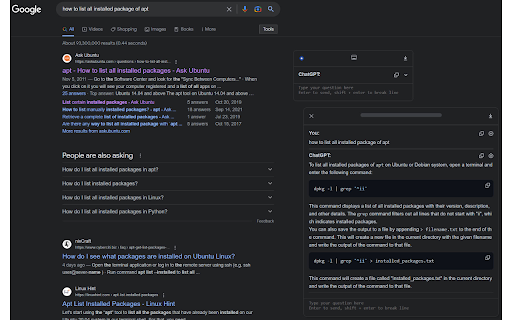
chatGPTBox is a Chrome extension that makes ChatGPT available on any webpage you visit. Instead of navigating to the ChatGPT website separately, users can summon the AI directly within their current browsing context—whether reading an article, writing an email, or conducting research. This seamless integration allows for quick questions, content generation, summarization, and more without breaking your flow. It’s a practical productivity tool for anyone who frequently uses AI assistance and values convenience, offering a streamlined way to harness ChatGPT’s capabilities throughout the entire web browsing experience. ---
How to Use
Install chatGPTBox and pin it to your browser toolbar. Click the icon on any webpage to open a ChatGPT prompt box, then type a question or select text to get instant AI responses. Works with different models and keeps a conversation history.
Core Features
Use Cases
- 1 chatGPTBox ai chrome extension's Use Cases
- 2 Summarizing articles or web pages quickly.
- 3 Translating text on any website.
- 4 Explaining code snippets found online.
- 5 Performing sentiment analysis on selected text.
- 6 Polishing written content.
- 7 Having conversations with ChatGPT while browsing the web.
Frequently Asked Questions
chatGPTBox is a browser extension that lets you access ChatGPT on any webpage. Open the chat dialog with a keyboard shortcut, summarize any page with one click, and swap between different APIs — it's designed for desktop browsers.
Quick Info
- Category
- Writing & Editing
- Subcategory
- AI Writing Assistants
- Added on
- Jun 30 2026
- Monthly Visits
- 10.0K
- Rating
- 4.6 / 5.0
- Reviews
- 118



