Gmail Add-on for Professional Email Writing - Chrome Extension
Gmail add-on using OpenAI to improve email professionalism and politeness.
Screenshots
Overview
This Gmail add-on leverages OpenAI technology to enhance the professionalism and politeness of emails written within the Gmail interface. It acts as a writing coach that helps users adjust tone and word choice to ensure their communication is courteous and business-appropriate. The extension is beneficial for professionals who frequently send emails in corporate or formal contexts and want to ensure their messages convey respect and clarity. It seamlessly integrates into the email composition flow, providing suggestions for refinement. This tool is valuable for those who want to improve their email etiquette without needing external editing software.
How to Use
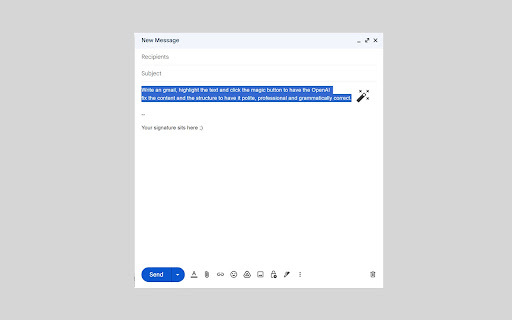
To use this Gmail add-on, install the extension and open Gmail in your browser. When composing an email, click the add-on button to have OpenAI analyze your draft—it will offer improvements for professionalism and politeness that you can accept or modify before sending.
Core Features
Use Cases
- 1 Gmail Add-on for Professional Email Writing ai chrome extension's Use Cases
- 2 Improving the tone of a potentially confrontational email.
- 3 Ensuring a formal email to a client is perfectly polished.
- 4 Making a request email more polite and likely to receive a positive response.
- 5 Simplifying complex language for better clarity.
Frequently Asked Questions
How does the add-on improve email tone?
Is my email data secure when using this add-on?
Quick Info
- Category
- Writing & Editing
- Subcategory
- AI Writing Assistants
- Added on
- Aug 24 2023
- Monthly Visits
- 2
- Rating
- 0.0 / 5.0



