I Wanna - Chrome Extension
Customizable prompt tool for text actions, integrating with OpenAI for summaries and translations.
Screenshots
Overview
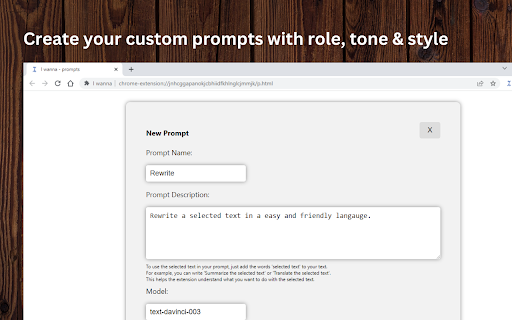
I Wanna is a Chrome extension that turns your browser into a flexible text-action workspace. It gives users a customizable prompt tool with direct OpenAI integration, allowing them to perform actions like summarizing, translating, or rewriting text right from the page they're on. Rather than opening a separate app or website, users can activate commands while reading articles, emails, or any web content, making it a practical companion for researchers, students, and multilingual workers. The emphasis is on light-weight customization, making it a handy utility for anyone who frequently interacts with text-heavy websites and needs quick AI assistance.
How to Use
Install I Wanna from the Chrome Web Store, then highlight text on any webpage. Click the extension icon, choose a prompt (like summarize or translate), and it sends your text to OpenAI, returning the result directly inline for easy copying or replacement.
Core Features
Use Cases
- 1 I Wanna ai chrome extension's Use Cases
- 2 Summarizing selected text
- 3 Translating selected text into another language
Frequently Asked Questions
What kind of actions can I perform with the 'I Wanna' extension?
Does the 'I Wanna' extension require an OpenAI API key?
Quick Info
- Category
- Writing & Editing
- Subcategory
- AI Writing Assistants
- Added on
- Feb 22 2023
- Monthly Visits
- 3
- Rating
- 0.0 / 5.0



