Notion Chrome Extension - Chrome Extension
Chrome extension for Notion: SidePanel titles, blog workflow, and AI tools.
0.0
Rating
142
Visits/mo
Screenshots
Overview
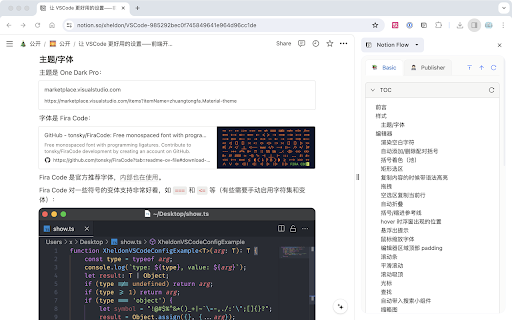
This Chrome extension enhances Notion usage by allowing users to view Notion content titles in the Chrome SidePanel. It also provides advanced features for building a blog publishing workflow based on Notion. Additionally, the plugin offers AI tools to assist in processing Notion content, ultimately improving work and life efficiency. It supports self-built OSS compatible with AWS S3 API.
How to Use
How to use Notion Chrome Extension ai chrome extension? Install the Chrome extension. Basic features allow viewing Notion content titles in the Chrome SidePanel. Advanced features enable building a blog publishing workflow. AI tools assist in processing Notion content.
Core Features
Notion Chrome Extension ai chrome extension's Core Features View Notion content titles in Chrome SidePanel Build a blog publishing workflow based on Notion AI tools for processing Notion content Support self-built OSS compatible with AWS S3 API
Use Cases
- 1 Notion Chrome Extension ai chrome extension's Use Cases
- 2 Quickly access Notion content titles while browsing
- 3 Automate blog publishing from Notion
- 4 Use AI to summarize or rewrite Notion content
Frequently Asked Questions
What are the basic features of the Notion Chrome extension?
It adds a SidePanel to Notion with quick access to page titles and a streamlined blog workflow. Basic features focus on faster navigation and page management.
What are the advanced features of the Notion Chrome extension?
Advanced features include AI-powered writing assistance and automation tools. These help you draft, edit, and organize content directly inside Notion.
How do the AI tools enhance Notion usage?
The AI tools generate text, rewrite drafts, and summarize content right inside your pages. This removes the need to switch between Notion and external writing apps.
Quick Info
- Category
- Writing & Editing
- Subcategory
- AI Writing Assistants
- Added on
- Jun 29 2026
- Monthly Visits
- 142
- Rating
- 0.0 / 5.0


