Paratranz Translation Accelerator - Chrome Extension
Browser extension to speed up Paratranz translation with DeepL and Terms integration.
Screenshots
Overview
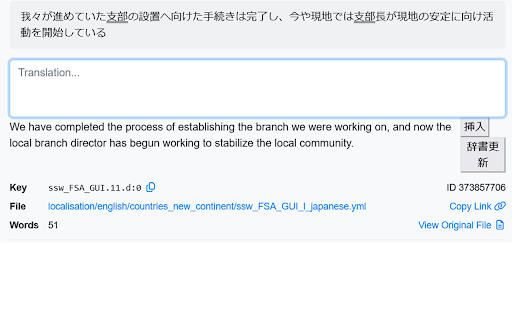
Paratranz Translation Accelerator is a Chrome extension designed to speed up the translation workflow on the Paratranz platform. It integrates DeepL and custom terminology management to provide more accurate and consistent translations. By offering quick access to translation tools directly in the browser, it reduces time spent switching between applications and improves efficiency for translators. This extension is particularly useful for localization professionals working with Paratranz who want to maintain high-quality output while handling larger volumes of content.
How to Use
Install the extension and connect your Paratranz account. During translation tasks, use DeepL for high-quality translations and auto-insert terms from your glossary. Click the extension icon to apply suggestions directly in the Paratranz interface.
Core Features
Use Cases
- 1 Paratranz Translation Accelerator ai chrome extension's Use Cases
- 2 Speeding up translation projects in Paratranz
- 3 Improving translation accuracy with Terms integration
- 4 Streamlining the translation process for individual translators and teams
Frequently Asked Questions
What is the main purpose of this browser extension?
How does the Terms integration improve translation accuracy?
Quick Info
- Category
- Writing & Editing
- Subcategory
- AI Writing Assistants
- Added on
- Jan 06 2024
- Monthly Visits
- 21
- Rating
- 1.0 / 5.0
- Reviews
- 1



