Scribens - Chrome Extension
Scribens is a spelling and grammar correction tool for multiple platforms in French and English.
Screenshots
Overview
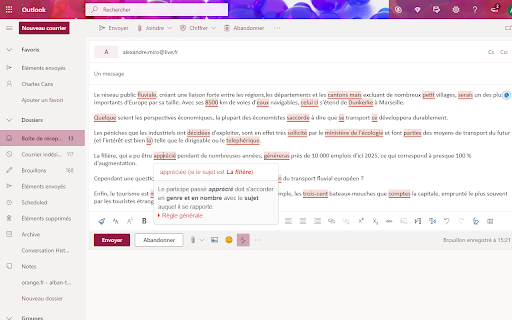
Scribens is a browser extension that acts as a diligent proofreader right inside your web pages. It checks your spelling and grammar in both French and English across a wide range of online platforms, covering everything from email clients to social media chat windows. It goes beyond simple spellcheck, offering style and punctuation improvements that help you write more clearly. For bilingual professionals and students writing on the fly, it’s a practical way to maintain quality and catch embarrassing errors without ever leaving the webpage you’re working on.
How to Use
Install the extension, then click its icon in your browser toolbar while on a supported website. The tool automatically checks your text in French or English. Review highlighted errors and suggestions, then apply corrections directly in the text field. Works across multiple platforms.
Core Features
Use Cases
- 1 Scribens ai chrome extension's Use Cases
- 2 Correcting emails before sending
- 3 Proofreading social media posts
- 4 Improving the quality of blog articles
- 5 Ensuring error-free documents and presentations
Frequently Asked Questions
How do I use Scribens?
Is registration required to use Scribens?
What is the character limit for the free version?
Quick Info
- Category
- Writing & Editing
- Subcategory
- AI Writing Assistants
- Added on
- Jul 21 2025
- Monthly Visits
- 20.0K
- Rating
- 3.9 / 5.0
- Reviews
- 74


