Wide GPT - Chrome Extension
Chrome extension to maximize ChatGPT screen space and improve readability.
Screenshots
Overview
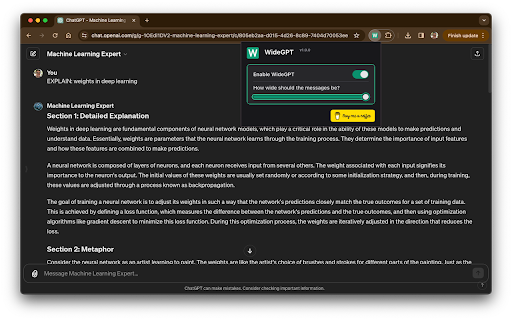
Wide GPT is a Chrome extension designed to maximize the screen space of ChatGPT and improve the readability of its interface. It adjusts the layout to a wider format, making better use of your display and enhancing the overall user experience. This tool is perfect for heavy ChatGPT users who find the default narrow layout limiting, especially when working with long conversations or complex code. By optimizing the view, Wide GPT helps you read and manage your interactions more comfortably, boosting productivity and reducing eye strain.
How to Use
How to use Wide GPT ai chrome extension? Simply install the Wide GPT extension from the Chrome Web Store. No further configuration is needed; it automatically widens the ChatGPT interface upon installation.
Core Features
Use Cases
- 1 Wide GPT ai chrome extension's Use Cases
- 2 Reading and interacting with long stories or articles on ChatGPT
- 3 Writing and reviewing code within ChatGPT
- 4 Engaging in extended conversations with AI on ChatGPT
Frequently Asked Questions
How do I install Wide GPT?
Do I need to configure anything after installing Wide GPT?
Is Wide GPT free to use?
What websites does Wide GPT work on?
Quick Info
- Category
- Writing & Editing
- Subcategory
- AI Writing Assistants
- Added on
- Apr 03 2026
- Monthly Visits
- 10.0K
- Rating
- 4.6 / 5.0
- Reviews
- 129


