ChatPaint - Chrome Extension
AI-powered painting assistant for creative image generation through text prompts.
Screenshots
Overview
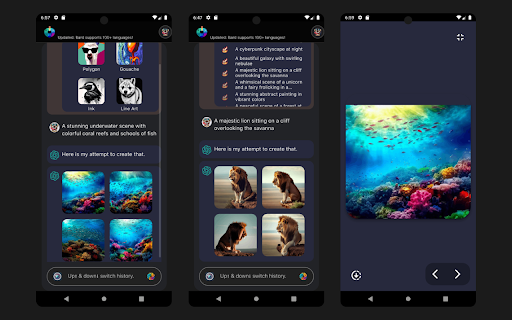
ChatPaint is a Chrome extension that functions as an AI-powered painting assistant, letting users generate creative images directly from text prompts without leaving their browser. It integrates seamlessly into the workflow, offering a lightweight and accessible way to brainstorm visuals, create quick concept art, or produce unique graphics for various projects. The extension simplifies the image generation process, making it beginner-friendly while still providing enough flexibility for experienced creators. It stands out as a convenient tool for anyone who wants a fast, efficient, and integrated creative solution right in their everyday browsing environment.
How to Use
Install the extension from the Chrome Web Store. Click the ChatPaint icon in your toolbar to open the prompt box. Type your image description and select any style preferences. Press generate to create the image, then save or copy it directly for your use.
Core Features
Use Cases
- 1 Creating various styles of images based on text descriptions
- 2 Learning painting through interactive AI assistance
- 3 Quickly completing painting tasks with AI support
- 4 Generating creative content for design projects
Frequently Asked Questions
How do I use ChatPaint as a Chrome extension?
Does ChatPaint support editing existing images?
Do I need design skills to use ChatPaint?
Quick Info
- Category
- Image Generation & Editing
- Subcategory
- Text to Image
- Added on
- Aug 25 2023
- Monthly Visits
- 74
- Rating
- 2.0 / 5.0
- Reviews
- 1
- Saved
- 2





