Serenade - Chrome Extension
Voice-controlled coding and web navigation tool.
Screenshots
Overview
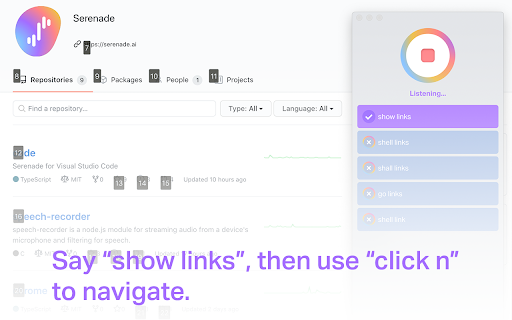
Serenade is a Chrome extension that brings voice-controlled coding and web navigation capabilities to developers and power users. Rather than relying exclusively on keyboards and mice, users can issue spoken commands to write code, navigate websites, and execute actions across their browser. It is especially beneficial for those looking to reduce typing strain, work hands-free, or streamline their overall digital interaction. Serenade creates a more flexible and accessible programming and browsing experience, allowing efficient multitasking without sacrificing precision. This tool represents a meaningful step forward in merging natural language control with everyday technical tasks.
How to Use
Install the Serenade native app and the Chrome extension. Once installed, speak commands to navigate the web, manage tabs, and write text in editable areas. No mouse or keyboard is required.
Core Features
Use Cases
- 1 Navigating websites hands-free
- 2 Writing code without typing
- 3 Managing browser tabs using voice commands
- 4 Filling out forms and text fields using voice
Frequently Asked Questions
What is Serenade?
What can I do with the Serenade Chrome extension?
Does Serenade require a native app?
Quick Info
- Category
- Writing & Editing
- Subcategory
- AI Writing
- Added on
- Sep 03 2021
- Monthly Visits
- 1000
- Rating
- 4.6 / 5.0
- Reviews
- 8