Gmail Add-on for Professional Email Writing
Gmail add-on using OpenAI to improve email professionalism and politeness.
Screenshots
Overview
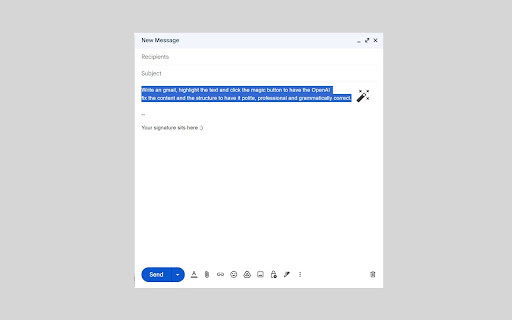
This Gmail add-on integrates OpenAI's language capabilities directly into your inbox, helping you refine drafts for greater professionalism and politeness. It analyzes your existing email content and suggests rephrased versions that sound more courteous, clear, and appropriate for the recipient. The tool is aimed at professionals who want to improve their written communication without starting from scratch. By working seamlessly within Gmail, it eliminates the need to switch between apps, making it easy to polish every outgoing message. Whether you're writing to a supervisor, a client, or a colleague, this add-on helps you strike the right tone with minimal effort.
How to Use
Install the add-on in Gmail, then compose a draft. Click the add-on icon to open it, and select options to rewrites your email for improved professionalism and politeness. Review the suggested version and insert it back into your compose window before sending.
Core Features
Use Cases
- 1 Improving the tone of a potentially confrontational email.
- 2 Ensuring a formal email to a client is perfectly polished.
- 3 Making a request email more polite and likely to receive a positive response.
- 4 Simplifying complex language for better clarity.
Frequently Asked Questions
How does the add-on improve email tone?
Is my email data secure when using this add-on?
Quick Info
- Category
- Writing & Editing
- Subcategory
- AI Email Writer
- Rating
- 5.0 / 5.0