AI Response Generator
Chrome extension for generating quick, tailored replies across various platforms.
5.0
Rating
Screenshots
Overview
The AI Response Generator is a Chrome extension designed to help users create quick, tailored replies across various platforms. It automates the process of writing responses for emails, chats, discussions, and more, enhancing productivity and saving time.
How to Use
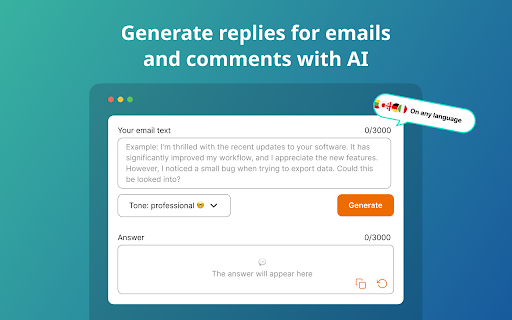
1. Install the Extension: Click “Add to Chrome.” 2. Launch the Extension: Click the app icon in your browser toolbar. 3. Enter Your Text: Input the text you need a reply for. 4. Submit: Hit the submit button.
Core Features
AI generated responses Customizable tones AI email reply Goal setting AI letter generator
Use Cases
- 1 Generate professional email responses
- 2 Enhance chat interactions with quick replies
- 3 Participate in online forums and discussions
- 4 Manage customer support queries
- 5 Respond to sales inquiries
- 6 Keep up with personal messages
- 7 Manage comments and direct messages for content creation
Frequently Asked Questions
How does it work?
You select or type the text you want to reply to, choose a tone, and it instantly generates a tailored response.
How do I get the best results?
Provide context and choose the tone or style that fits the platform and conversation.
Is response AI available only in English?
No, it supports multiple languages.
Is my data secure?
Yes, your data is encrypted and is never sold or shared.
Can I use it for free?
Yes, it offers a free plan, with a paid upgrade for more features and usage.
Quick Info
- Category
- Writing & Editing
- Subcategory
- AI Message Generator
- Rating
- 5.0 / 5.0