ChatGPT Easy Folders
Chrome extension for organizing ChatGPT conversations with folders, AI assistant, and prompt library.
Screenshots
Overview
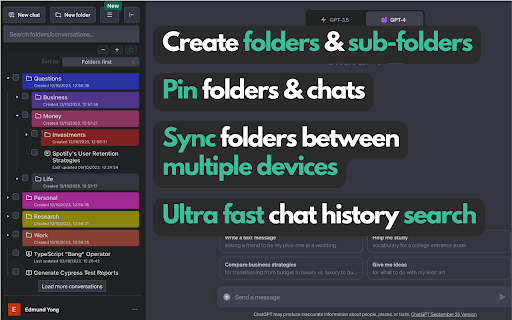
ChatGPT Easy Folders enhances ChatGPT with organizational features like folders for conversations, an AI assistant for summarization or guidance, and a built-in prompt library. It's a Chrome extension tailored for heavy ChatGPT users who juggle many threads and need better structure. The tool helps keep chats categorized and readily retrievable, reducing clutter and improving workflow efficiency. It's especially useful for researchers, writers, and developers—anyone who manages numerous AI interactions daily.
How to Use
Add the extension to Chrome, then sign in to your ChatGPT account. Use the folder interface to drag and drop conversations into custom categories, access the AI assistant for quick organization, and browse the prompt library to save reusable templates for future chats.
Core Features
Use Cases
- 1 Organizing ChatGPT conversations by project, client, or topic
- 2 Using the AI Copilot Assistant for quick answers and assistance while browsing the web
- 3 Leveraging the prompt library for inspiration and to improve ChatGPT responses
- 4 Creating custom prompts for specific tasks and workflows
- 5 Sharing folders of useful prompts and conversations with team members
Frequently Asked Questions
Is this extension affiliated with OpenAI?
What user data is collected by the extension?
How do I get support for the extension?
Quick Info
- Category
- Writing & Editing
- Subcategory
- AI Prompt Generator
- Rating
- 5.0 / 5.0