ChatGPT Prompt Plus
Chrome extension to save and reuse ChatGPT prompts with customizable templates.
Screenshots
Overview
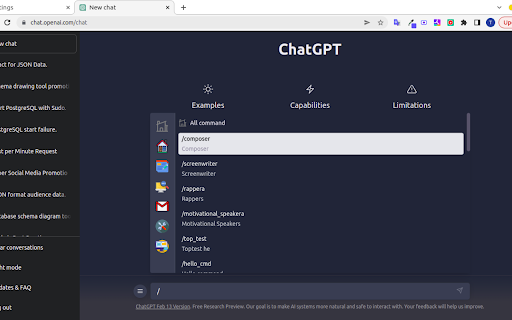
ChatGPT Prompt Plus is a Chrome extension that enhances your daily use of ChatGPT by simplifying prompt management. It allows users to save, organize, and reuse their most effective prompts with ease. The key feature is its customizable templates, which enable you to store prompts with placeholders for variable information, creating reusable workflows for tasks like drafting emails, writing reports, or generating code. This makes it an invaluable tool for professionals who rely on consistent, structured interactions with ChatGPT.
How to Use
Install the ChatGPT Prompt Plus extension, then manage prompts through the customization panel. Create templates with variables, save them under specific categories, and insert them into ChatGPT conversations with a single click from the toolbar.
Core Features
Use Cases
- 1 Quickly access and use frequently used commands and phrases in ChatGPT
- 2 Create adaptable prompts with parameters for different scenarios
Frequently Asked Questions
How do I access the prompt settings?
How do I use a prompt?
Why can't I send prompts with parameters?
Quick Info
- Category
- Writing & Editing
- Subcategory
- AI Prompt Generator
- Rating
- 5.0 / 5.0