ChatGPT Prompt Plus
Chrome extension to save and reuse ChatGPT prompts with customizable templates.
Screenshots
Overview
ChatGPT Prompt Plus is a Chrome extension designed to enhance the ChatGPT experience by allowing users to save, manage, and reuse prompts easily. It enables the creation of a prompt library with flexible templates, including parameters with customizable details like default values and input types. This facilitates the creation of high-quality and adaptable prompts for various use cases.
How to Use
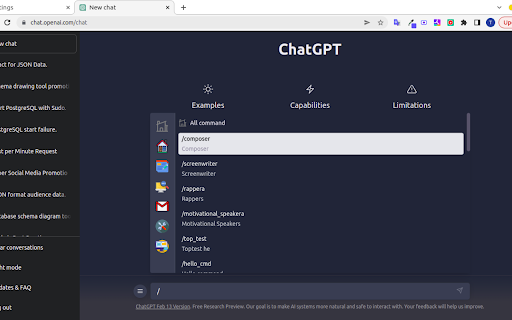
1. Access the prompt setting page via the hamburger icon in ChatGPT. 2. Add and detail your prompt in the prompt setting. 3. Type a forward slash (/) in the chat input to open the prompts list. 4. Select a prompt and fill in any required parameter data. 5. Click the 'Send icon' to proceed.
Core Features
Use Cases
- 1 Quickly access and use frequently used commands and phrases in ChatGPT
- 2 Create adaptable prompts with parameters for different scenarios
Frequently Asked Questions
How do I access the prompt settings?
How do I use a prompt?
Why can't I send prompts with parameters?
Quick Info
- Category
- Writing & Editing
- Subcategory
- AI Prompt Generator
- Rating
- 5.0 / 5.0