AI Prompt Saver
Chrome extension to save and reuse AI prompts securely.
Screenshots
Overview
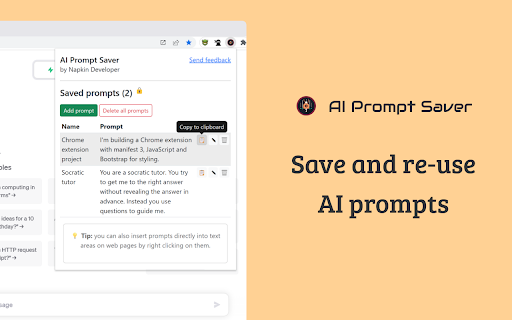
AI Prompt Saver is a Chrome extension that offers a simple and secure solution for managing your AI prompt library. It allows users to save valuable prompts directly from their browser for future reuse, eliminating the need for scattered notes or documents. Importantly, it focuses on security, providing a trusted space to store your prompts. This tool is perfect for power users of ChatGPT or similar services who want to organize their workflow and access their best ideas instantly.
How to Use
Install the Chrome extension, then open your AI chat platform. Highlight a prompt you want to save, click the extension icon, and store it in a secure vault. Reuse saved prompts by clicking them from the popup menu during future sessions.
Core Features
Use Cases
- 1 Quickly insert frequently used prompts into AI tools like OpenAI and Bard.
Frequently Asked Questions
Where are the prompts stored?
How do I add a prompt?
How do I insert a prompt?
Quick Info
- Category
- Writing & Editing
- Subcategory
- AI Prompt Generator
- Rating
- 5.0 / 5.0