AI Prompt Saver
Chrome extension to save and reuse AI prompts securely.
5.0
Rating
Screenshots
Overview
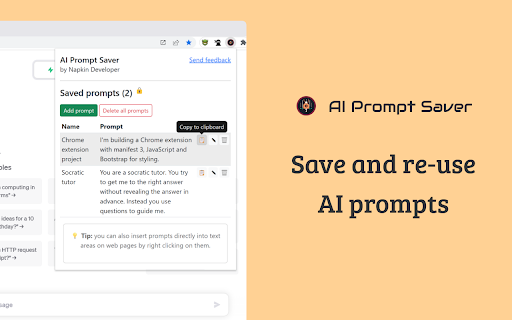
AI Prompt Saver is a Chrome extension designed to help users save and reuse prompts for AI tools like OpenAI and Bard. It allows users to store prompts securely in their browser, add prompts by selecting text on a webpage or via the extension toolbar button, and insert prompts by right-clicking on a text input area.
How to Use
Install the AI Prompt Saver Chrome extension. Save prompts by selecting text on a webpage or using the toolbar button. Access and insert prompts by right-clicking in a text input area.
Core Features
Save and reuse prompts Add prompts via text selection or toolbar button Securely store prompts in the browser Insert prompts via right-click context menu
Use Cases
- 1 Quickly insert frequently used prompts into AI tools like OpenAI and Bard.
Frequently Asked Questions
Q:Where are the prompts stored? A:Prompts are stored locally in your browser using Chrome's secure storage, so they never leave your device. Q:How do I add a prompt? A:Click the extension icon, then use the Add Prompt button to save a new prompt with a title and content. Q:How do I insert a prompt? A:Open the extension, select the prompt you want, and it will be inserted directly into your active text field.
For details, please visit the official website of AI Prompt Saver.
Quick Info
- Category
- Writing & Editing
- Subcategory
- AI Prompt Generator
- Rating
- 5.0 / 5.0