Bulk ChatGPT Prompter
Browser extension for efficient bulk prompting in ChatGPT with data saving capabilities.
Screenshots
Overview
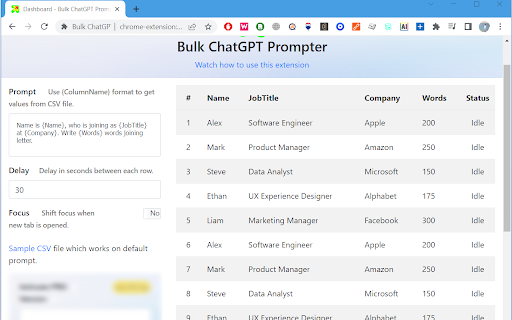
Bulk ChatGPT Prompter is a browser extension designed for handling multiple prompts at once within ChatGPT. Instead of submitting requests one by one, you can input a list of prompts and have them processed sequentially, automatically saving the responses for later use. This is especially useful for researchers, data collectors, or content managers who need to run large batches of similar queries and organize the output, cutting down manual repetitive labor significantly.
How to Use
Install the Bulk ChatGPT Prompter extension in Chrome, then open ChatGPT. Compose or paste multiple prompts into the extension's interface, setting any desired order or delays. Run the batch to send them sequentially into ChatGPT, saving your prompts and data for reuse. Export results as needed for analysis.
Core Features
Use Cases
- 1 Automated testing of ChatGPT responses with multiple inputs
- 2 Generating content in bulk for different topics
- 3 Running A/B tests with different prompts
- 4 Saving ChatGPT responses for analysis and reporting
Frequently Asked Questions
What file format is required for uploading prompts?
Can I control the speed at which prompts are sent to ChatGPT?
Does the extension work with any website?
How do I save ChatGPT data with Version 2?
Quick Info
- Category
- Writing & Editing
- Subcategory
- AI Prompt Generator
- Rating
- 5.0 / 5.0