Bulk ChatGPT Prompter
Browser extension for efficient bulk prompting in ChatGPT with data saving capabilities.
Screenshots
Overview
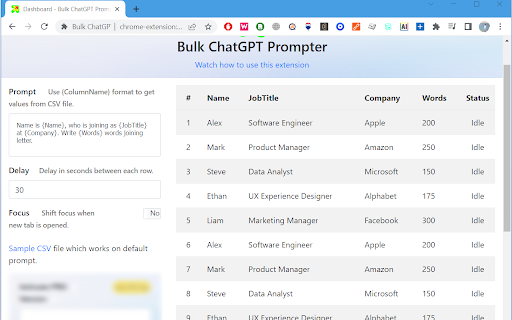
The Bulk ChatGPT Prompter is a browser extension designed to streamline the ChatGPT experience. It allows users to upload multiple prompts via a CSV file for seamless input processing. Users can customize delay options to control the pace at which each row is sent. The extension ensures users never lose tab focus while running prompts, maintaining an uninterrupted workflow. Version 2 introduces the ability to save ChatGPT data by sending web requests to user-defined endpoints.
How to Use
Install the browser extension. Upload a CSV file containing your prompts. Configure delay settings. Run the prompts. Version 2 allows configuring endpoints to save ChatGPT responses.
Core Features
Use Cases
- 1 Automated testing of ChatGPT responses with multiple inputs
- 2 Generating content in bulk for different topics
- 3 Running A/B tests with different prompts
- 4 Saving ChatGPT responses for analysis and reporting
Frequently Asked Questions
What file format is required for uploading prompts?
Can I control the speed at which prompts are sent to ChatGPT?
Does the extension work with any website?
How do I save ChatGPT data with Version 2?
Quick Info
- Category
- Writing & Editing
- Subcategory
- AI Prompt Generator
- Rating
- 5.0 / 5.0