Skribr
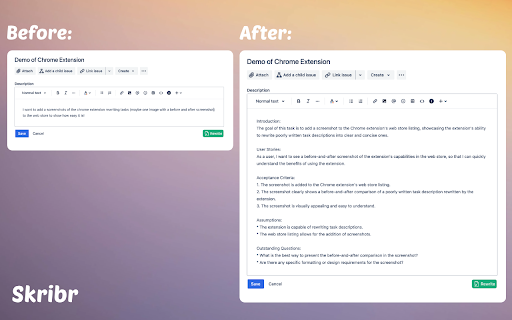
Skribr rewrites poorly written task descriptions with one click for clarity.
Screenshots
Overview
Skribr acts as a quick editor for poor writing, specifically targeting confusing task descriptions. With just one click, it analyzes unclear or structurally flawed text and rewrites it into straightforward, readable instructions. This tool is essential for managers assigning work, team leaders coordinating projects, or anyone who needs to communicate requirements effectively. By enhancing clarity, Skribr reduces misunderstandings and increases the efficiency of any workflow. Users can expect a polished, professional version of their text instantly, ensuring that every task is communicated with precision and understandable to everyone involved.
How to Use
Paste a poorly written task description into Skribr and click rewrite. The tool cleans up grammar, structure, and ambiguity, producing a clear version you can copy or further edit. Ideal for project briefs or instructions.
Core Features
Use Cases
- 1 Improving the clarity of project tasks for better team understanding.
- 2 Refining user stories for software development.
- 3 Simplifying instructions for customer service agents.
Frequently Asked Questions
How does Skribr rewrite task descriptions?
Is Skribr suitable for all types of task descriptions?
Quick Info
- Category
- Writing & Editing
- Subcategory
- AI Rewriter
- Rating
- 5.0 / 5.0