Scribens
Scribens is a spelling and grammar correction tool for multiple platforms in French and English.
5.0
Rating
Screenshots
Overview
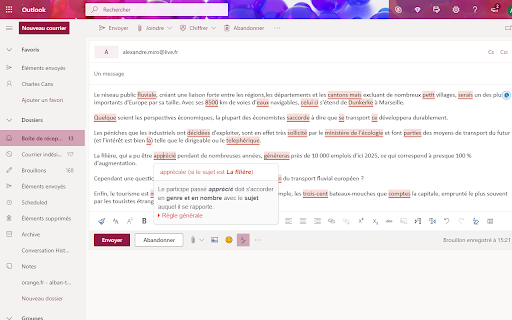
Scribens is a tool designed to correct spelling and grammar errors across various platforms, including email services like Gmail, Hotmail, and Outlook.com, social media platforms such as Facebook, Twitter, LinkedIn, and Instagram, and websites like WordPress. It also supports office applications like Google Docs, Word Online, Google Slides, and Microsoft PowerPoint. Scribens offers corrections in both French and English.
How to Use
To use Scribens, click on the Scribens icon located at the top right of a text area to start the correction process. Click the icon again to get style suggestions.
Core Features
Spelling and grammar correction in French and English Style suggestions Integration with various platforms and applications
Use Cases
- 1 Correcting emails before sending
- 2 Proofreading social media posts
- 3 Improving the quality of blog articles
- 4 Ensuring error-free documents and presentations
Frequently Asked Questions
How do I use Scribens?
Paste or type your text into Scribens or install its browser extension, and it highlights spelling, grammar, and style errors with correction suggestions.
Is registration required to use Scribens?
No, registration is not required to use Scribens.
What is the character limit for the free version?
The free version caps each check at a set number of characters, with premium plans offering a higher limit.
Quick Info
- Category
- Writing & Editing
- Subcategory
- AI Spell Check
- Rating
- 5.0 / 5.0