Prompt Template Tool - Chrome Extension
Unified tool for managing prompt templates for AI models.
Screenshots
Overview
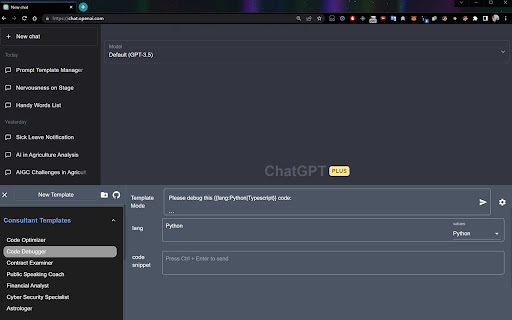
Prompt Template Tool is a Chrome extension that unifies prompt template management across multiple AI models. Instead of maintaining separate notes for different chatbots, users manage all templates in one place for tools like ChatGPT, Claude, Poe, Yiyan, and Xinghuo. Templates can be created from scratch, organized by purpose, and extended over time as users refine what works. Rather than retyping lengthy instructions every time, users select a ready-made template and focus on the task. It is useful for power users who switch between models.
How to Use
How to use Prompt Template Tool ai chrome extension? Users can create templates with named slots using the `{{...}}` marker. These slots can then be filled with specific requests or parameters. The tool also supports creating selectors with predefined options. Templates can be organized into folders and moved around via drag-and-drop.
Core Features
Use Cases
- 1 Prompt Template Tool ai chrome extension's Use Cases
- 2 Creating reusable prompts for different AI models
- 3 Organizing prompts by category or project
- 4 Sharing prompt templates with others
- 5 Generating content in multiple languages
Frequently Asked Questions
What is a prompt template?
How do I organize my prompt templates?
Can I share my prompt templates with others?
Is my data private?
Quick Info
- Category
- Writing & Editing
- Subcategory
- Prompt Engineering
- Added on
- Jul 17 2023
- Monthly Visits
- 288
- Rating
- 0.0 / 5.0